The T900 Engine, on your device
Give AI the right context, not all your context.
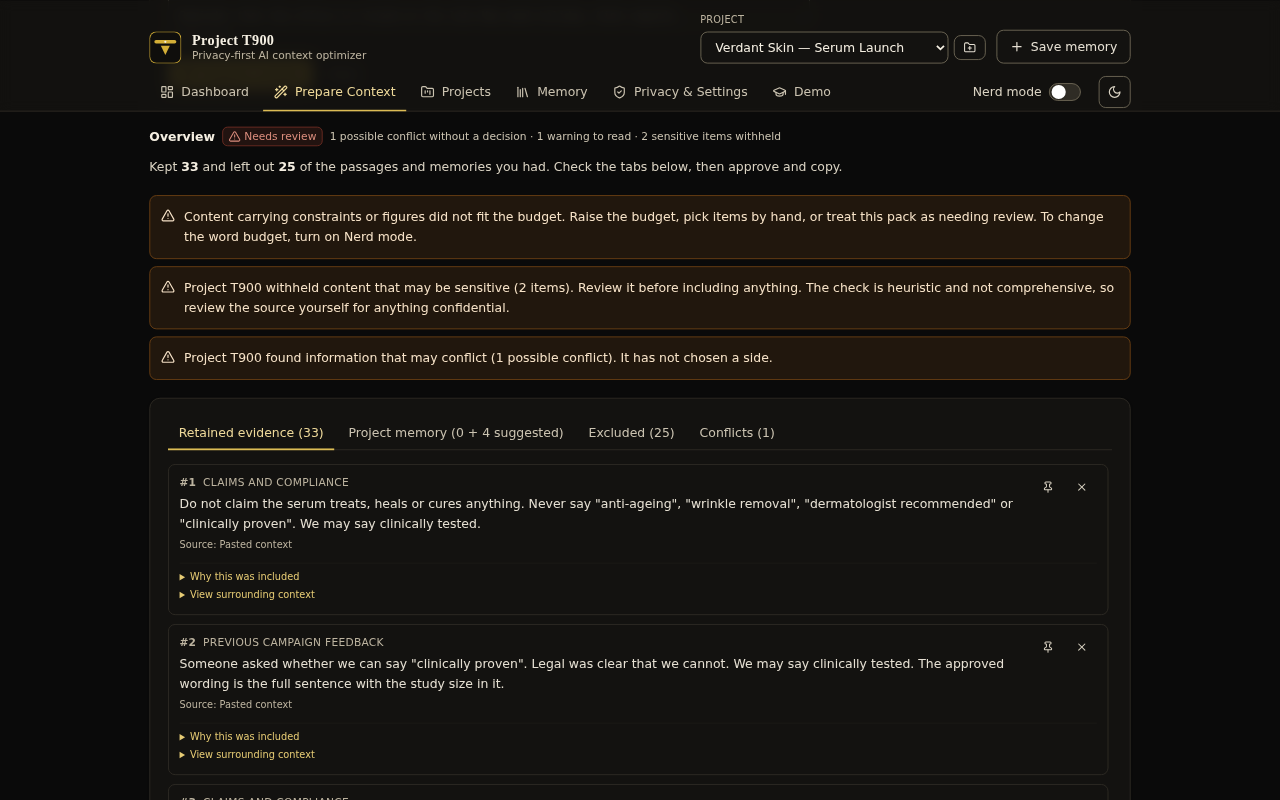
Project T900 prepares what you give ChatGPT, Claude or Gemini. Its T900 Engine keeps what is relevant to your task, leaves out repetition and noise, flags statements that contradict each other, and shows you everything before you copy it or insert it.
It runs on your device and never sends anything for you.
A browser extension for Chrome, Edge, Brave, Arc and Firefox, and a desktop app for Mac, Windows, and Debian or Ubuntu. Free to use, with no account.
How it works
-
Give it your material
Paste your notes, or drop in PDF, Word or Markdown files. It can also read printed English text in an image. Everything is read on your device.
-
Say what the task is
The T900 Engine keeps what is relevant to the task and leaves out repetition and noise. It protects the details that carry weight, such as dates, figures, quotes and constraints, and flags statements that contradict each other.
-
Review, approve, paste
See why each passage was kept. Nothing is copied or inserted until you tick the approval box. On ChatGPT, Claude or Gemini, the extension puts the context above your prompt when you choose Insert, and you press Send yourself.
What it does
-
Keeps what matters
Relevant passages stay, repetition and noise go, and every passage it keeps comes with the reason.
-
Protects the details
Dates, figures, quotes, prohibitions and constraints carry weight, so it protects them, and tells you when they do not fit the budget.
-
Flags contradictions
An old launch date next to the new one, for example. It shows you both and lets you decide which to keep.
-
Remembers your project
Approved project knowledge, such as brand voice, approved claims and audience, is suggested when it is relevant. Nothing is added without you seeing it.
-
Reads your files
PDF, Word and Markdown files, and printed English text in images, all on your device.
-
Simple, or Nerd mode
It starts simple. Turn on Nerd mode for optimization modes, word budgets, relevance scores and token estimates.
Private by design
WildOwlLab receives nothing: not your text, not your files, not even how often you use Project T900.
- No account, no servers, no analytics, no tracking.
- Your library stays on your device. Project T900 makes no network requests of its own, and its pages are locked down so the browser would refuse any.
- It looks at a page only when you open Project T900 on it, and reads only your prompt, or text you selected, when you click.
- Nothing is copied or inserted until you tick the approval box, and it never presses Send.
- This website has no cookies, no scripts and no analytics either. Vercel, which hosts it, sees each visitor's IP address, as any web host does.
Download
The first public release is on its way. It will be listed here.
Honest about limits
The T900 Engine is not an AI model: it selects and orders your own text, and never writes or rewrites any of it. Project T900 does not guarantee better answers, prevent hallucinations, or promise token, speed or cost savings, and its token counts are local estimates.
What it does is make the choice of context visible and reviewable, so you decide what the AI sees.
It is an early version, so expect rough edges, and tell us about them at [email protected].